Instructions to use iFlytekOpenSource/Domux with libraries, inference providers, notebooks, and local apps. Follow these links to get started.
- Libraries
- Transformers
How to use iFlytekOpenSource/Domux with Transformers:
# Use a pipeline as a high-level helper from transformers import pipeline pipe = pipeline("text-generation", model="iFlytekOpenSource/Domux") messages = [ { "role": "user", "content": [ {"type": "image", "url": "https://huggingface.co/datasets/huggingface/documentation-images/resolve/main/p-blog/candy.JPG"}, {"type": "text", "text": "What animal is on the candy?"} ] }, ] pipe(text=messages)# Load model directly from transformers import AutoProcessor, AutoModelForMultimodalLM processor = AutoProcessor.from_pretrained("iFlytekOpenSource/Domux") model = AutoModelForMultimodalLM.from_pretrained("iFlytekOpenSource/Domux", device_map="auto") messages = [ { "role": "user", "content": [ {"type": "image", "url": "https://huggingface.co/datasets/huggingface/documentation-images/resolve/main/p-blog/candy.JPG"}, {"type": "text", "text": "What animal is on the candy?"} ] }, ] inputs = processor.apply_chat_template( messages, add_generation_prompt=True, tokenize=True, return_dict=True, return_tensors="pt", ).to(model.device) outputs = model.generate(**inputs, max_new_tokens=40) print(processor.decode(outputs[0][inputs["input_ids"].shape[-1]:])) - Notebooks
- Google Colab
- Kaggle
- Local Apps Settings
- vLLM
How to use iFlytekOpenSource/Domux with vLLM:
Install from pip and serve model
# Install vLLM from pip: pip install vllm # Start the vLLM server: vllm serve "iFlytekOpenSource/Domux" # Call the server using curl (OpenAI-compatible API): curl -X POST "http://localhost:8000/v1/chat/completions" \ -H "Content-Type: application/json" \ --data '{ "model": "iFlytekOpenSource/Domux", "messages": [ { "role": "user", "content": "What is the capital of France?" } ] }'Use Docker
docker model run hf.co/iFlytekOpenSource/Domux
- SGLang
How to use iFlytekOpenSource/Domux with SGLang:
Install from pip and serve model
# Install SGLang from pip: pip install sglang # Start the SGLang server: python3 -m sglang.launch_server \ --model-path "iFlytekOpenSource/Domux" \ --host 0.0.0.0 \ --port 30000 # Call the server using curl (OpenAI-compatible API): curl -X POST "http://localhost:30000/v1/chat/completions" \ -H "Content-Type: application/json" \ --data '{ "model": "iFlytekOpenSource/Domux", "messages": [ { "role": "user", "content": "What is the capital of France?" } ] }'Use Docker images
docker run --gpus all \ --shm-size 32g \ -p 30000:30000 \ -v ~/.cache/huggingface:/root/.cache/huggingface \ --env "HF_TOKEN=<secret>" \ --ipc=host \ lmsysorg/sglang:latest \ python3 -m sglang.launch_server \ --model-path "iFlytekOpenSource/Domux" \ --host 0.0.0.0 \ --port 30000 # Call the server using curl (OpenAI-compatible API): curl -X POST "http://localhost:30000/v1/chat/completions" \ -H "Content-Type: application/json" \ --data '{ "model": "iFlytekOpenSource/Domux", "messages": [ { "role": "user", "content": "What is the capital of France?" } ] }' - Docker Model Runner
How to use iFlytekOpenSource/Domux with Docker Model Runner:
docker model run hf.co/iFlytekOpenSource/Domux
[HER Hack-Astron #4] Clarify, Bind, Commit:有歧义的 Domux 指令先确认,再执行
我验证的是一个实际集成问题:当 Domux 输出不能唯一定位设备时,怎样先澄清并绑定
确认,再把动作安全提交到 Home Assistant,而不是默认选择列表第一项。
结论先说:48 组 clear/ambiguous 配对指令中,Domux 的 clear specificity 为 48/48,
ambiguity sensitivity 为 47/48;原始 v1 完整策略只有 42/48,通过条件要求全量成功,
所以质量门是 FAIL。我保留了失败样本,没有选择性重跑或用后续代码覆盖结论。
最终参考实现把 4 条固定 Domux 输出接入真实 Home Assistant:3/3 精确状态变更,
1/1 在 prepare 后发生状态漂移并在 dispatch 前拒绝。
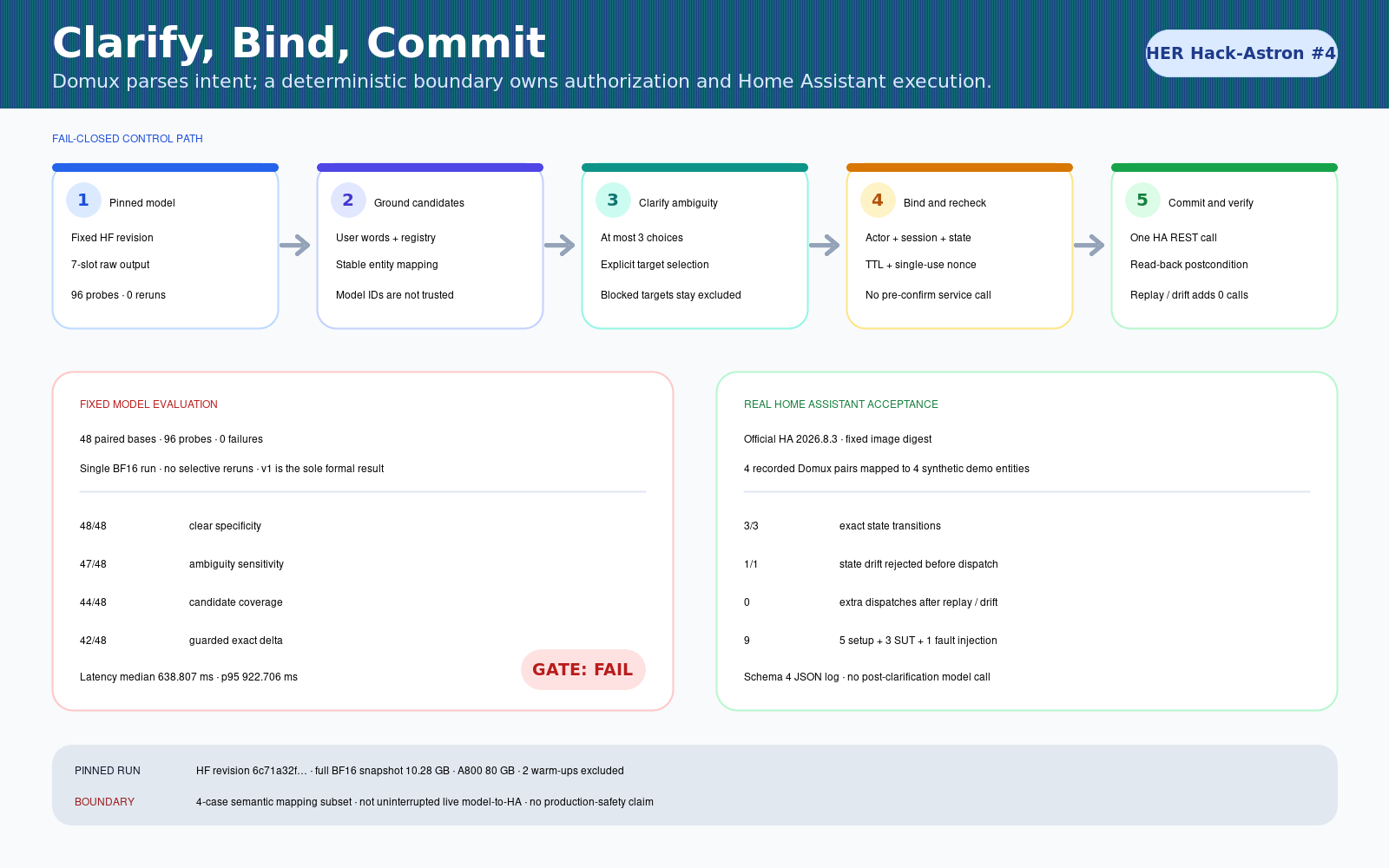
固定证据:
模型与环境
iFlytekOpenSource/Domux@6c71a32f4d624cadfd9fce9d10240d8068e53456- Full BF16 snapshot:13 files / 10,279,032,574 bytes
- Python 3.12.12;transformers 5.15.0;torch 2.10.0+cu128
- 单卡 NVIDIA A800-SXM4-80GB
- greedy;temperature 0;max_new_tokens 128;seed 20260826
- 2 条独立 warm-up;96 probes;0 failure;0 selective rerun
- load 4.564 s;peak allocated 10,244,988,416 bytes
env -u HF_ENDPOINT -u HUGGINGFACE_HUB_BASE_URL \
hf download iFlytekOpenSource/Domux \
--revision 6c71a32f4d624cadfd9fce9d10240d8068e53456 \
--local-dir ./domux-6c71a32
run_model.py 会核验 revision、文件大小、hash 和 Hub 元数据;GitHub 不含权重。
原始输出
Turn off the Light in the Living Room on the Ground Floor.
turnOff|Light|*|*|*|Living Room|Ground Floor
Turn off the light.
turnOff|Light|*|*|*|*|*
Set the hall curtain to 20 percent.
set|Curtain|position|20|Percent|Hall|*
结果
统计单元是 48 个配对 base,不把 96 probes 当成独立样本。二元比例使用 Wilson
双侧 95% 区间,预注册比较使用 exact McNemar + Holm 校正。
| 指标 | 结果 |
|---|---|
| clear specificity | 48/48 |
| ambiguity sensitivity | 47/48 |
| candidate coverage | 44/48 |
| original guarded B2 | 42/48,gate FAIL |
| safe-abstain baseline | 47/48;dispatch 1/48;wrong target 0/48 |
| paired latency | median 638.807 ms;p95 922.7055 ms |
当前 clarify_commit.py 是查看失败后的最终参考实现,不用于重写原始 v1 数字。
真实 Home Assistant
固定 digest 的官方 Home Assistant 2026.8.3 镜像运行在 loopback 随机端口,
限制 1.5 CPU / 2 GiB / 512 PIDs。
- 3/3:灯、窗帘位置、空调温度精确提交并回读;
- 1/1:prepare 后通过真实 HA REST 改变目标状态,返回
state_changed / INVALIDATED,0 SUT dispatch; - nonce replay 新增 SUT 调用为 0;
- 调用分账:5 setup + 3 SUT + 1 fault injection = 9;
- schema 4 日志绑定执行时两个源文件和两个输入文件的 SHA-256。
{
"status": "passed",
"successful_transitions": 3,
"rejected_before_dispatch": 1,
"sut_dispatches": 3,
"artifact_sha256": "aa5a70e5d19a0cd90fd673e3f19224231da086dff766ee05aaead8141a6017f0"
}
限制也写清楚:澄清答案来自冻结合成 scenario gold,确认后没有再次调用模型;
HA 使用 4 个语义映射实体,不是完整 inventory。因此它不是不间断 live
model-to-HA,也不是 production-safety 认证。
复现
cd cases/domux-clarify-commit
python -m unittest discover -s tests -q
python ha_acceptance.py --output /tmp/domux-ha-acceptance.json
核心测试预期 Ran 159 tests、OK;第二条需要 Docker,并在结束时清理任务资源。
模型重跑的完整命令与评测命令写在 case README。
失败、安全与许可
- malformed、expired、replayed nonce 和 state drift 均保持 0 device call;
- postcondition mismatch 明确标为
FAILED_POSTCONDITION,不假装没有执行; - 64 个场景均为原创合成,只含 Light/Curtain/AC,无真实家庭或业务数据;
- 合成数据/data card 为 CC BY 4.0;案例代码沿用 Apache-2.0;上游许可不变;
- 无 token、cookie、私有 endpoint、个人路径、权重或高风险真实设备。
AI 辅助说明
使用 AI 辅助方案讨论、代码审阅、测试;提交者审阅实验、原始输出、最终提交。
